B2B FINTECH · ENTERPRISE UX

B2B SME Loan
Application Redesign

Streamlining High-Friction SME Onboarding Risk Assessment Workflows

Product Design B2B FinTech Enterprise Workflow
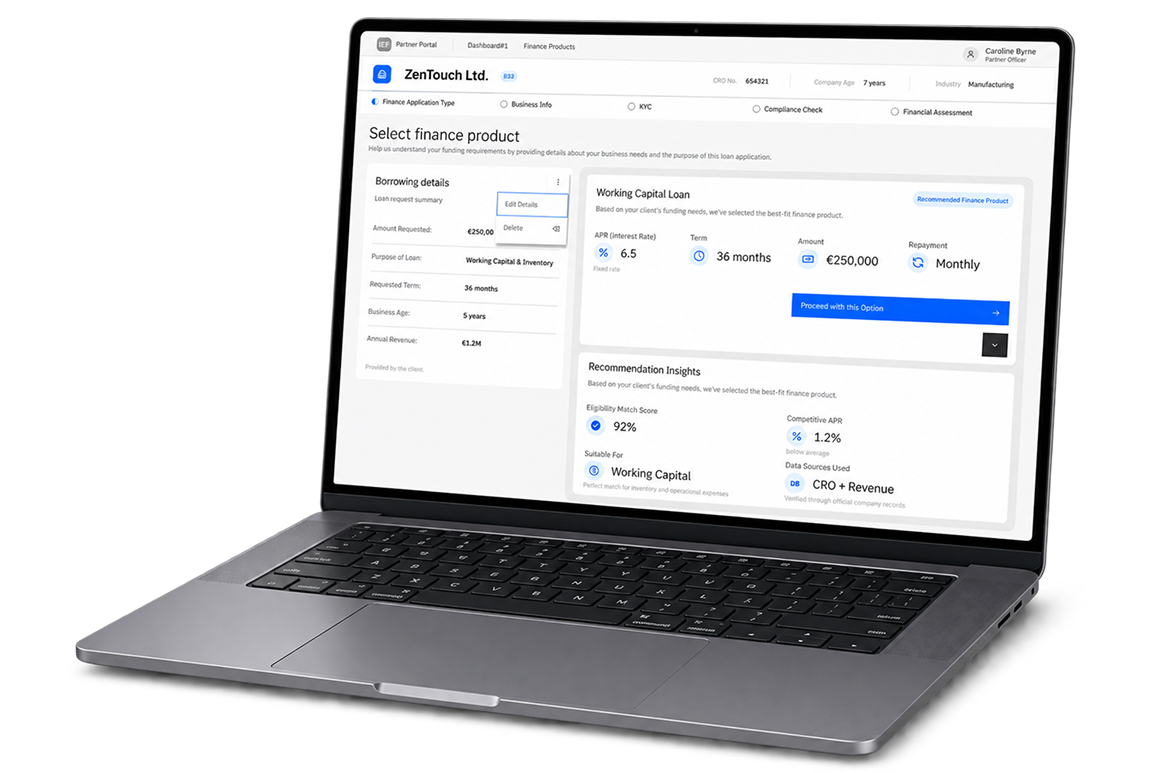
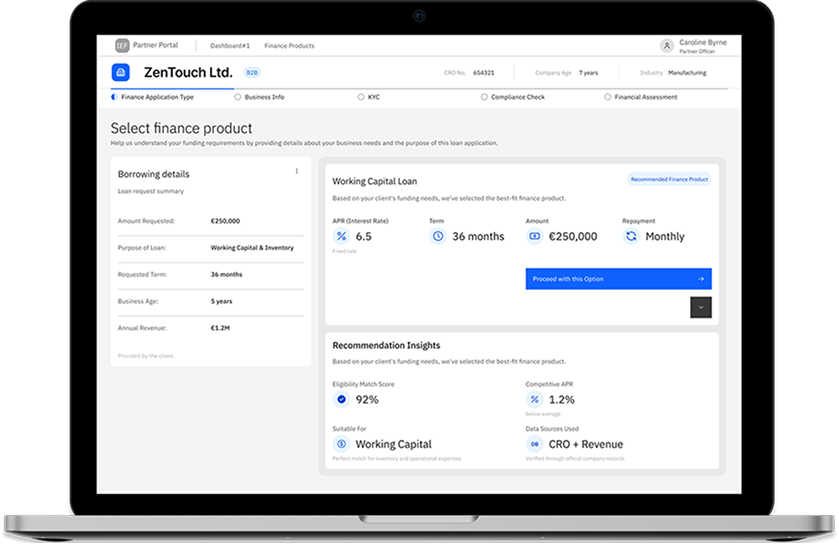
IEFinance loan application displayed on a laptop
B2B FINTECH · ENTERPRISE UX

Redesigning the B2B SME
Loan Application Portal

Transforming a high-friction, multi-step risk assessment workflow into an intuitive, progressive disclosure onboarding experience.

PROJECT SNAPSHOT
ROLE
Senior Product Designer Lead UX/UI Architecture
PLATFORM
Enterprise B2B SaaS FinTech Portal
CORE IMPACT
Reduced onboarding completion time, eliminated form drop-off, and accelerated compliance review cycles.
IEFinance loan application displayed on a laptop
PROBLEM: High Cognitive Load & Abandonment Rates
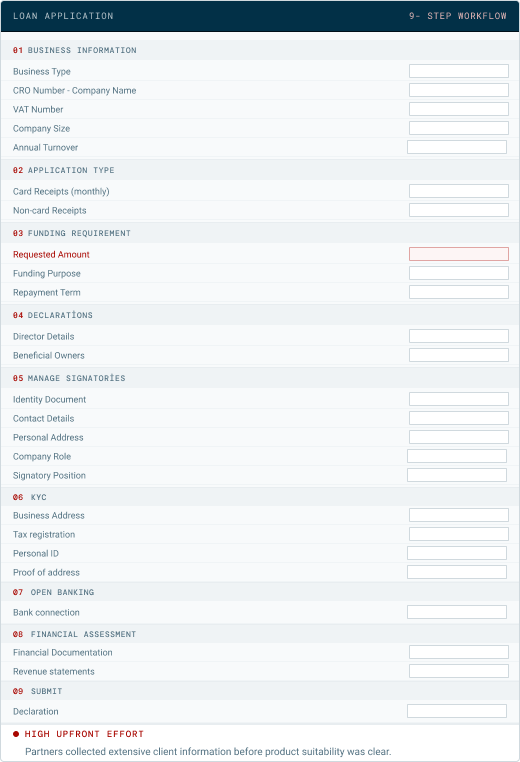
  • Small and medium enterprise (SME) applicants faced a dense, 25+ field form requiring complex financial data, KYC documentation, and multi-role approvals.
  • Friction Points: High cognitive overload, unclear error-state handling, lack of session-saving capability, and frequent session timeouts leading to a high drop-off rate during risk verification.
BEFORE 9-STEP WORKFLOW

Front-loaded data collection

Previous nine-step loan application workflow
SYSTEM LOGIC
REDESIGNED
9 4 STEPS CONSOLIDATED
Ask less
Retrieve
available data
Guide
progressively
AFTER 4-STEP WORKFLOW

Progressive, system-assisted workflow

Redesigned four-stage system-assisted workflow
DESIGN HYPOTHESIS · SYSTEM LOGIC

System-Assisted Data
& Early Guidance

Reorganizing the application flow to reduce unnecessary partner input, retrieve available data automatically, and provide guidance earlier in the process.

01

Progressive Disclosure

Restructuring the dense 9-step application into four logically grouped stages, while requesting additional partner input only when it becomes relevant or requires review.

9 STEPS 4 STAGES
02

System-Assisted Validation

Automatically retrieving and validating available business data, while asking partners to review only information that is missing or requires attention.

RETRIEVE VALIDATE REVIEW
03

Multi-Role Alignment

Designing distinct views for SME applicants with clear progress and minimal friction, and compliance officers with faster risk assessment.

APPLICATION ARCHITECTURE

Restructuring the
Application Architecture

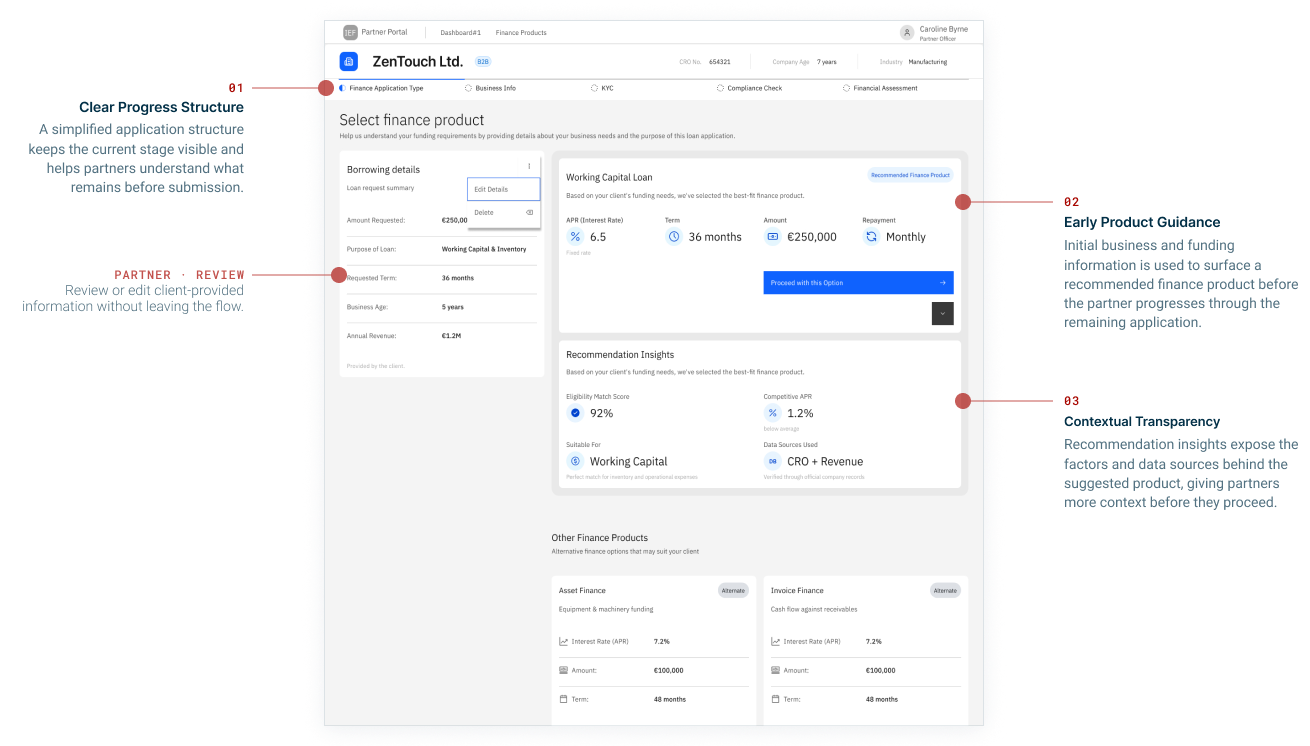
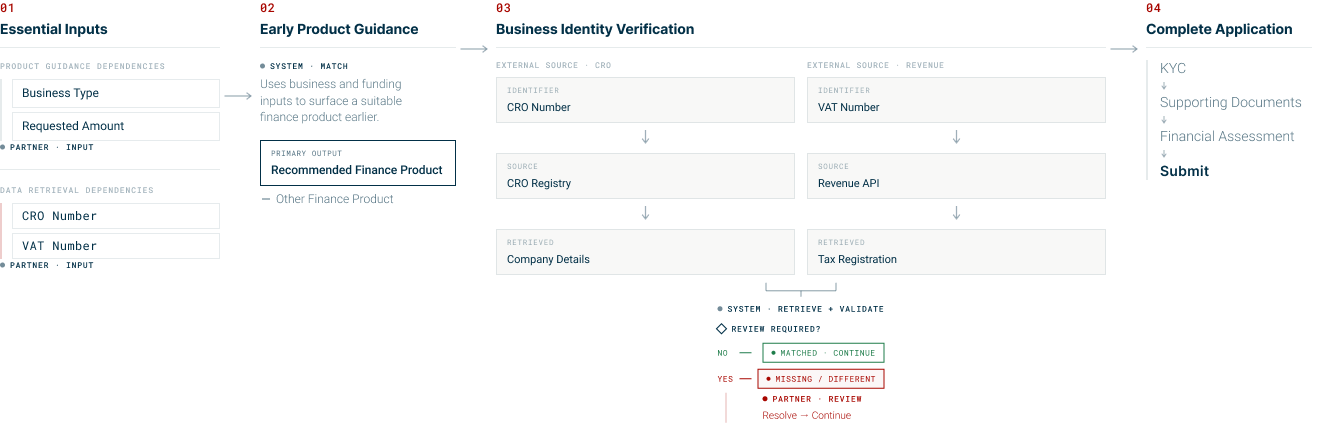
Essential inputs now trigger product guidance, external data retrieval and conditional review throughout the application.

Application architecture showing essential inputs, early product guidance, business identity verification, conditional review, and application completion.
PARTNER experience

Streamlining the Partner Application Experience

The redesigned flow gives partners clearer progress, earlier product guidance and more context for confident decision-making.

Application architecture showing essential inputs, early product guidance, business identity verification, conditional review, and application completion.
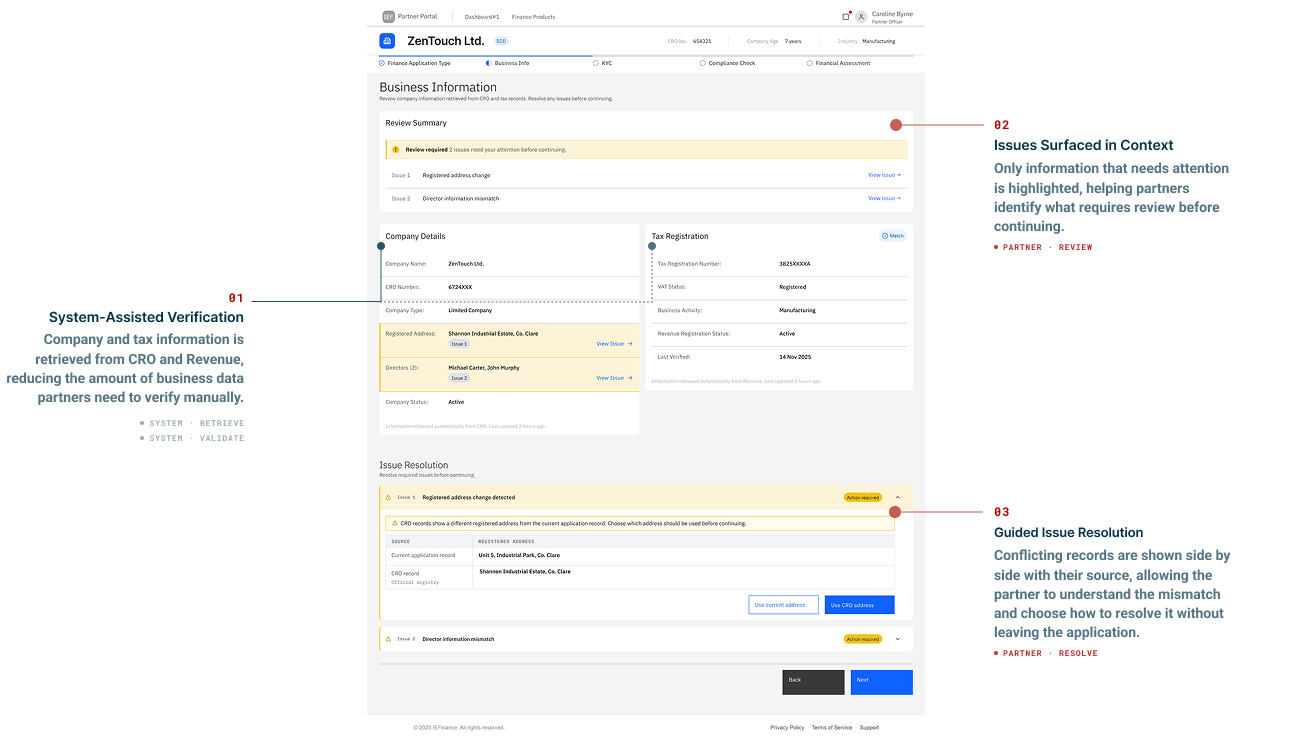
Data Review & Validation

Turning Data Validation into Actionable Review

Retrieved business data is verified by the system, while partner attention is directed to information that requires review.

Application architecture showing essential inputs, early product guidance, business identity verification, conditional review, and application completion.
Component System

Extending Carbon for Data Review

Reusable states and composite patterns create a consistent path from verified data to exception review and resolution.

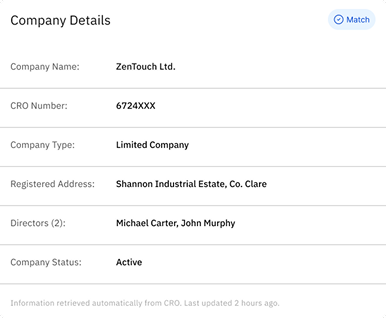
01 · STRUCTURED LIST DATA VALIDATION STATES
• VERIFIED
Verified company details structured list
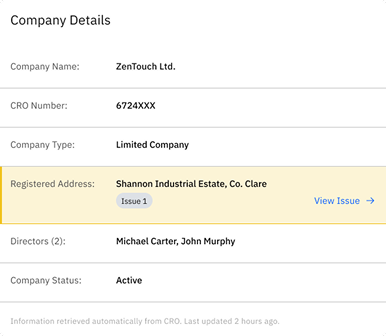
• REVIEW REQUIRED
Company details structured list requiring review
↓ USER ACTION → VIEW ISSUE → REVEAL RESOLUTION CONTEXT

STRUCTURED LIST

validationState =
verified / reviewRequired

DATA ROW

state = default / issue

CONDITIONAL UI

Match → verified
Issue tag + View issue → reviewRequired

COMPONENT SYSTEM

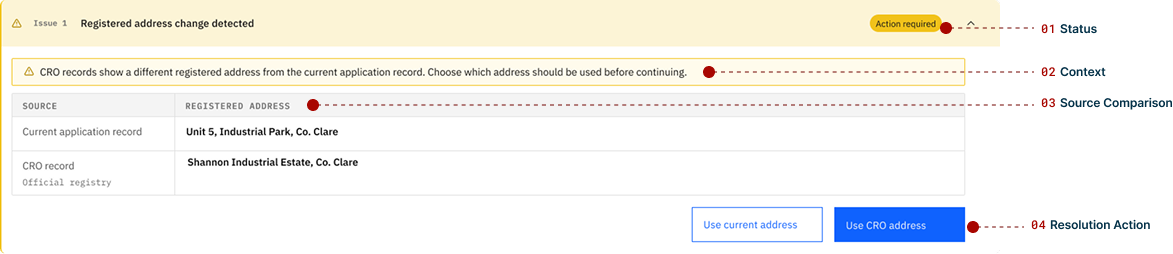
Extending Carbon for Resolution

01 · COMPONENT SYSTEM PROGRESSIVE DISCLOSURE
COLLAPSED expanded = false
Collapsed issue component showing a registered address change requiring action
EXPANDED expanded = true
Expanded issue component showing status, context, source comparison and resolution actions
Constraints & Trade-Offs

Designing for Real-World Constraints

How technical and regulatory assumptions shaped the proposed experience.

CONSTRAINT CONSIDERED
DESIGN RESPONSE
USER BENEFIT
01
External data and document checks may not return instantly.
Use asynchronous processing with clear progress indicators and real-time status updates.
Partners can continue working without wondering whether the system has stalled.
02
CRO, Revenue and banking data may conflict with existing records.
Flag only affected rows and connect each row to its corresponding issue panel.
Partners can identify and resolve mismatches without reviewing the entire application.
03
KYC and GDPR requirements demand clear evidence and user control.
Show the data source, explain why action is required and request confirmation before records are updated.
Partners can make informed decisions with greater confidence.
DESIGN PRINCIPLE

I treated constraints as interaction requirements—not reasons to expose backend complexity to the user.

DESIGN OUTCOMES

Validating the Hypothesis Through Design Outcomes

The redesigned workflow reduced structural complexity, minimized upfront partner input, and shifted available business-data retrieval to the system.

WORKFLOW STAGES
09 Before
-5 STAGES
04 Redesigned

Nine front-loaded stages were reorganized into four logically grouped stages.

ESSENTIAL INPUTS
04

Inputs required upfront

  • CRO number
  • VAT number
  • Business type
  • Requested amount

Only the information needed to establish initial context is requested upfront.

CONNECTED SOURCES
02

External data sources

CRO + REVENUE
POST-LAUNCH METRICS TO VALIDATE
Completion rate ↑ Time to submit ↓ Manual data entry ↓ Issue-resolution rate ↑

These are proposed success measures for the prototype, not production results.

REFLECTION

Reflection & Scalability Lessons

What the redesign taught me about simplifying complex workflows, introducing automation responsibly, and validating system-assisted experiences.

WORKFLOW ARCHITECTURE

Complexity can be structured without hiding necessary information.

Progressive disclosure helped restructure the dense 9-stage application into four logically grouped stages, while requesting additional information only when it became relevant.

SYSTEM + HUMAN

Automation works best when ambiguity remains visible.

The system can retrieve, validate and compare available business information, but conflicting records should be surfaced for partner review and client confirmation.

NEXT ITERATION

Automation works best when ambiguity remains visible.

Exploring AI-assisted document pre-parsing to auto-fill financial figures directly from uploaded PDF tax returns.

Designing for enterprise complexity is not about removing information.
— it is about revealing the right information at the right moment.